Shopify Inventory Management: The Complete Guide (2026)
Master Shopify inventory management with proven formulas, real examples, and strategies that prevent stockouts and cut dead stock. Updated for 2026.
Your Shopify store just had its best weekend ever. 147 orders in two days. You should be celebrating. Instead, you're staring at your admin panel, realizing 23 of those orders are for products you don't actually have in stock.
This is what bad Shopify inventory management looks like. And if you've been running your store for more than a few months, some version of this has probably happened to you.
The good news: inventory management isn't complicated. It's a set of habits, formulas, and systems that - once in place - run mostly on autopilot. This guide covers everything you need, from the basics to advanced forecasting, with real numbers and formulas you can use today.
What Shopify Gives You Out of the Box
Before adding any apps or systems, it helps to understand what Shopify already handles.
Shopify's built-in inventory features include quantity tracking per product and variant, multi-location support (up to 1,000 locations on Plus), inventory transfer between locations, basic inventory history and adjustment logging, and CSV import/export for bulk updates.
For a store with fewer than 50 products and one location, these basics can work fine. You manually check stock, mentally track what's selling, and reorder when things look low.
The problem starts when you grow past that. Once you're managing 100+ SKUs, selling through multiple channels, or working with suppliers that have 2-3 week lead times, "checking when things look low" stops working. That's where inventory management as a discipline comes in.
The Five Pillars of Shopify Inventory Management
Every effective inventory system - whether you build it with spreadsheets, apps, or a combination - rests on five core practices.
1. Know Your Sales Velocity
Sales velocity is the number of units you sell per day for each product. It's the single most important number in inventory management because everything else builds on it.
To calculate it: take the total units sold over a period and divide by the number of days.
Sales Velocity = Units Sold / Number of Days
For example, if you sold 420 units of a product over the past 30 days, your daily sales velocity is 14 units/day.
Why does this matter? Because once you know velocity, you can answer the most important question in inventory: "How many days of stock do I have left?"
Days of Stock = Current Inventory / Daily Sales Velocity
If you have 280 units and sell 14/day, you have 20 days of stock. Now you can make decisions instead of guesses.
A common mistake is using your all-time average velocity. Products have seasonality. A winter jacket that averages 5/day across 12 months might actually sell 15/day in November and 1/day in June. Use the last 30 days as your default, and adjust when you know a seasonal shift is coming.
For more on calculating and using sales velocity, read our guide to daily sales velocity for Shopify.
2. Set Reorder Points for Every Product
A reorder point is the inventory level at which you need to place a new order with your supplier. Drop below this number, and you risk running out before the new stock arrives.
The formula is straightforward:
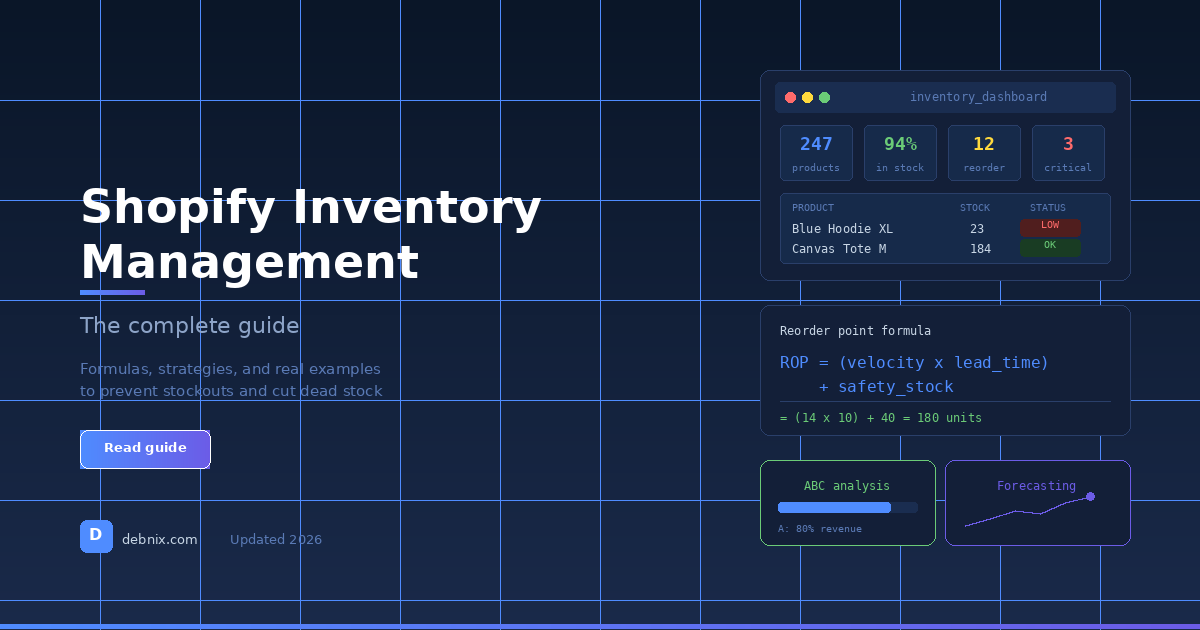
Reorder Point = (Daily Sales Velocity x Supplier Lead Time) + Safety Stock
Here's a real example. Say you sell a candle that moves 8 units/day. Your supplier takes 10 days to deliver. You want 5 days of safety stock as a buffer.
ROP = (8 x 10) + (8 x 5) = 80 + 40 = 120 units
When your candle stock hits 120 units, it's time to reorder. Not tomorrow. Not when you get around to it. Now. Because if you wait even 3 days at 8 units/day, that's 24 fewer units of buffer - and one supplier delay away from a stockout.
The safety stock multiplier depends on how reliable your supplier is and how stable your sales are. If your supplier is consistently on time and your sales don't fluctuate much, 3 days of safety stock might be enough. If either is unpredictable, go with 7-10 days.
For a deeper look at how reorder points connect to forecasting, see our Shopify inventory forecasting guide.
3. Classify Products with ABC Analysis
Not all products deserve equal attention. ABC analysis sorts your catalog by revenue contribution:
- A items (top 20% of products): generate roughly 80% of your revenue. These get the most attention, highest safety stock, and most frequent monitoring.
- B items (next 30%): contribute about 15% of revenue. Standard monitoring and moderate safety stock.
- C items (bottom 50%): contribute about 5% of revenue. Minimal monitoring. These are also where dead stock tends to hide.
A store with 200 products might have 40 A-items, 60 B-items, and 100 C-items. The instinct is to treat them all the same. The reality is that running out of an A-item costs you 10x more than running out of a C-item.
Here's how ABC analysis changes your behavior:
For A-items, you check stock weekly (or daily during peak season), maintain 7-10 days of safety stock, reorder proactively, and negotiate better terms with suppliers because the volume justifies it.
For C-items, you check monthly, keep minimal safety stock, consider whether some should be discontinued entirely, and don't tie up cash in products that barely move.
For a step-by-step breakdown of how to run ABC analysis on your Shopify catalog — including the actual formula and a full worked example — see our ABC analysis guide for Shopify.
If you run a boutique or clothing store, see how ABC analysis applies in our boutique inventory management guide.
4. Track Costs and Protect Margins
Revenue means nothing without margin. And margin starts with knowing your Cost of Goods Sold (COGS) for every product.
Gross Margin = ((Selling Price - COGS) / Selling Price) x 100
A t-shirt that sells for $35 with a COGS of $12 has a 65.7% gross margin. That same t-shirt, after a supplier price increase to $18, drops to 48.6% margin. If you're not tracking COGS per product, you won't catch this until your bank account tells you.
The products to watch most carefully are the ones with high velocity AND thin margins. A product that sells 50/day at 20% margin might look like a winner on revenue reports but is actually barely worth carrying once you factor in shipping, storage, and returns.
Track COGS religiously. Update it every time your supplier changes pricing. And review margins quarterly - products that dip below your minimum acceptable margin either need a price increase or need to go.
5. Monitor and Act on Alerts
The best inventory data in the world is useless if nobody acts on it. This is where most Shopify sellers fail - not because they lack information, but because they don't have a system that puts the right information in front of them at the right time.
Effective inventory alerts should tell you when a product hits its reorder point, when a product has zero sales for 30+ days (potential dead stock), when sales velocity spikes or drops significantly, and when you're overstocked on slow-moving items.
Shopify's built-in low stock alerts are basic - they trigger at a single threshold you set per product. That's better than nothing, but it treats a product that sells 50/day the same as one that sells 2/day. Both might alert at 10 units, but 10 units means very different things for each.
This is why days-of-stock matters more than unit count for alerts. Alerting at "less than 7 days of stock" accounts for each product's actual velocity. See our complete guide on how to prevent stockouts on Shopify for the full system.
If you run a specialized store type: the five pillars above apply broadly, but certain categories have their own inventory quirks worth a deeper look. If that's you, see our dedicated guides for boutique inventory management, jewelry inventory management, or clothing store inventory management.
Common Shopify Inventory Mistakes (and How to Fix Them)
After working with Shopify sellers, certain patterns come up again and again.
Mistake 1: Using Spreadsheets Past Their Expiration Date
Spreadsheets work until they don't. The breaking point is usually around 100 SKUs or when you add a second sales channel. At that point, the spreadsheet becomes a liability - it's always slightly outdated, formulas break, and nobody trusts the numbers.
The fix: move to a system that syncs directly with your Shopify data. Whether that's an app, a proper inventory management tool, or even a well-connected Google Sheet with Shopify API integration, the key is real-time data.
Mistake 2: Setting One Alert Threshold for Everything
If you set "low stock = 10 units" across your entire catalog, your fast-movers will stock out while your slow-movers trigger false alarms constantly. A product selling 20/day hitting 10 units is a crisis (half a day of stock). A product selling 1/week hitting 10 units has two and a half months left.
The fix: calculate reorder points individually using the formula above, or at minimum, use days-of-stock as your alert metric instead of raw unit count.
Mistake 3: Ignoring Dead Stock
Dead stock is inventory that hasn't sold in 30, 60, or 90+ days. It sits in your warehouse, ties up cash, and slowly loses value. The longer you ignore it, the worse it gets.
A healthy Shopify store should have less than 10% of its SKUs classified as dead stock. If you're above 20%, you have a buying problem - you're ordering products customers don't want, or ordering too much of products with limited demand.
The fix: run a dead stock report monthly. For anything that hasn't moved in 60+ days, decide: discount it, bundle it, or liquidate it. Holding onto it "just in case" is almost always the wrong call.
We have a full guide on how to find and fix dead stock on Shopify including six strategies for clearing it ranked by cash recovery.
Mistake 4: Reordering Without Checking Lead Times
Your supplier's lead time is not a constant. It changes with their production capacity, shipping conditions, holidays, and raw material availability. If you set your reorder point assuming a 10-day lead time and your supplier is now taking 18 days, you're going to stock out.
The fix: review and update supplier lead times every quarter. Ask your supplier directly. And build in a buffer - if they say 14 days, plan for 17.
Shopify's Built-in Features vs. Third-Party Apps
Shopify's native inventory tools have improved significantly over the past few years, especially with the migration away from Stocky (which is shutting down August 31, 2026). Here's an honest comparison of what's built in versus what you need an app for.
What Shopify Does Well
Shopify handles basic tracking, multi-location inventory, transfers between locations, and inventory adjustments with reason codes. For a single-location store with a manageable catalog, this covers the fundamentals.
The Shopify admin also now includes inventory reports with month-end snapshots, average inventory sold per day, and percent of inventory sold. These are useful starting points for understanding your stock health.
Where Shopify Falls Short
Shopify doesn't natively offer demand forecasting or stockout prediction, automatic reorder point calculation, ABC analysis, purchase order management with supplier tracking, profitability analysis per product, or AI-driven alerts that learn from your sales patterns.
These gaps are exactly where inventory management apps add value. They take the raw data Shopify collects and turn it into actionable intelligence - telling you not just what your stock level is, but what it will be in 14 days if current trends continue.
For a live view of all these metrics in one place, see how a Shopify inventory dashboard brings them together.
Choosing the Right Inventory App
When evaluating apps, the things that actually matter are whether the app calculates reorder points based on your real sales data (not just static thresholds you set manually), whether it provides ABC analysis or equivalent product classification, whether purchase orders are built in (so you can go from "reorder needed" to "PO sent" in one workflow), and how much it costs relative to its value.
Many inventory apps charge $50-150/month, which makes sense for stores doing $50K+ in monthly revenue. For smaller stores, look for apps that offer the core features (reorder points, alerts, forecasting) at a lower price point.
We built Debnix specifically for this gap - AI-powered predictions, reorder points, ABC analysis, purchase orders, and profit tracking at $21.99/month with a 30-day free trial. But regardless of which tool you choose, the important thing is having a system - any system - that automates these calculations.
For a more detailed comparison, read our roundup of the best Shopify inventory management apps.
Building Your Inventory Management Routine
Systems and apps are only as good as the habits around them. Here's a practical routine that works for stores of all sizes.
Daily (5 minutes)
Check your alerts. Any product that hit its reorder point needs a purchase order today, not tomorrow. Glance at any unusual spikes - a product suddenly selling 3x its normal rate might mean you need to accelerate a reorder.
Weekly (15 minutes)
Review your top 10 products (A-items) by days of stock remaining. Are any trending toward stockout? Check for any new dead stock candidates - products that had their last sale more than 30 days ago. Review any pending purchase orders and their expected delivery dates.
Monthly (30 minutes)
Run a full ABC analysis and update product classifications. Review supplier lead times and update reorder points if needed. Check margin health - any products where COGS has crept up without a price adjustment? Look at dead stock and make decisions: discount, bundle, or liquidate.
Quarterly (1 hour)
Review overall inventory health metrics: average days of stock across your catalog, total capital tied up in inventory, stockout rate (percentage of days a product was out of stock), dead stock percentage, and inventory turnover rate. Compare to previous quarters. Are things improving? These numbers tell the story.
Inventory Forecasting: The Next Level
Once you've mastered the basics (velocity, reorder points, ABC analysis), the next step is forecasting - predicting what your sales will look like in the future so you can prepare for them.
Simple forecasting uses historical averages. If you sold 300 units of a product last June, you might estimate 300-330 for this June. That works for stable products without strong trends.
More sophisticated forecasting accounts for seasonality (does this product sell 3x more in Q4?), trend direction (is month-over-month demand growing or shrinking?), external factors (are you running a promotion? is a competitor running out of a similar product?), and day-of-week patterns (some products sell more on weekends).
AI-powered forecasting tools analyze your historical sales data to identify these patterns automatically and project future demand. This is particularly valuable for stores with seasonal products, growing catalogs, or supply chains with long lead times. For a full breakdown of how forecasting works in practice, see our Shopify inventory forecasting guide.
The key insight is this: forecasting doesn't need to be perfect. It needs to be better than guessing. Even a rough forecast that's 70% accurate saves you from the worst stockouts and the worst overstock situations.
Key Formulas Cheat Sheet
Here are the essential inventory formulas in one place:
Sales Velocity = Units Sold / Number of Days
Days of Stock = Current Inventory / Daily Sales Velocity
Reorder Point = (Daily Sales Velocity x Lead Time) + Safety Stock
Safety Stock = Daily Sales Velocity x Buffer Days
Inventory Turnover = COGS / Average Inventory Value
Gross Margin = ((Price - COGS) / Price) x 100
GMROI = Annual Gross Margin ($) / Average Inventory Value (at cost)
Stockout Cost = Lost Daily Sales x Avg Order Value x Days Out of Stock
Print these. Pin them above your desk. They're the foundation of every inventory decision you'll make.
TL;DR
- Sales velocity is the foundation of everything. Calculate it per product using the last 30 days of sales data.
- Reorder points should be set for every product using the formula: (Daily Sales x Lead Time) + Safety Stock. Never reorder based on gut feeling.
- ABC analysis helps you focus your time and safety stock on the 20% of products that drive 80% of revenue.
- Track COGS for every product. Revenue without margin data is flying blind.
- Set alerts based on days of stock, not raw unit counts. Ten units means very different things for different products.
- Build a routine: 5 minutes daily, 15 minutes weekly, 30 minutes monthly. Inventory management is a habit, not a project.
- Shopify's built-in features handle the basics but fall short on forecasting, reorder point calculation, and purchase order management. A dedicated inventory app fills these gaps.
Try Debnix free for 30 days
AI-powered inventory predictions, profit tracking, and supplier emails.
Start Free Trial